
Highway Radar
Highway RadarAuto & Vehicles
4.2159.00 Reviews
- Version
- 3.2 (update 7)
- Installs
- 100.00K
- Age Rating
- Everyone
Screenshots
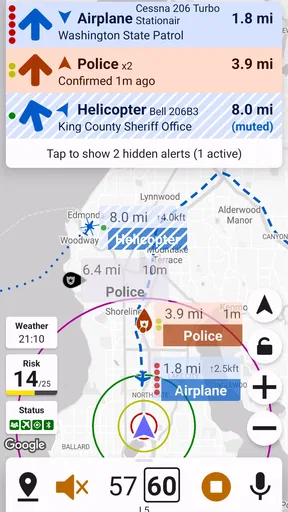
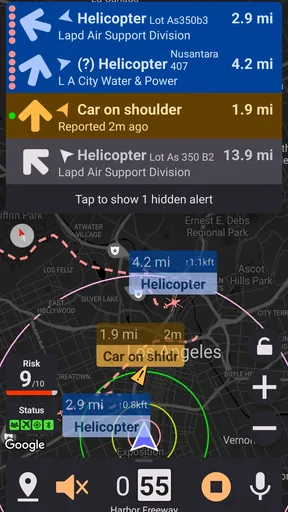
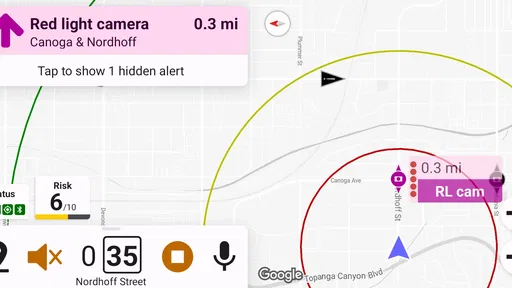
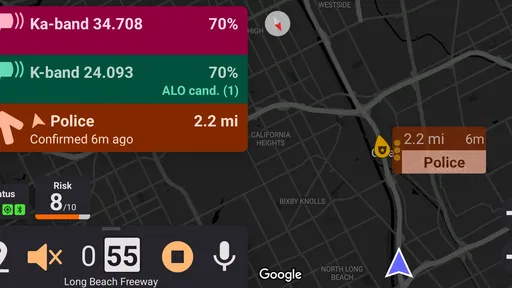
Our Review of Highway Radar
 Analysis by Appyee
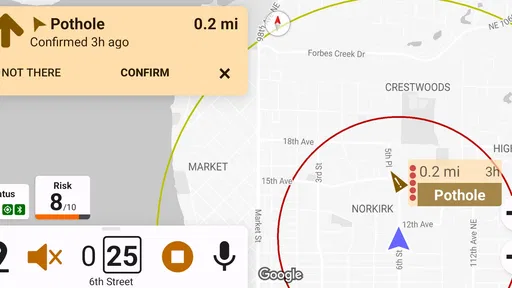
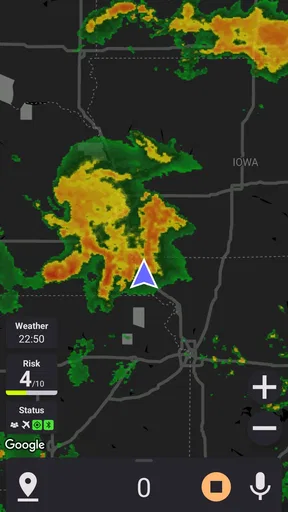
Driving apps are easy to judge when the road is quiet and the screen is convenient. They are harder to judge in the moments that matter: when traffic is moving quickly, sunlight is washing out the display, or I need information without taking my attention away from the lane. Highway Radar is a free Auto & Vehicles app from Highway Radar that focuses on giving drivers earlier awareness of speed traps and road hazards. After spending time with it, I see its value less as a replacement for careful driving and more as an additional layer of awareness.
The app has a practical purpose, but its usefulness depends heavily on how responsibly it is used. It can help me prepare for a changing stretch of road, yet no warning should encourage sudden braking, distracted checking, or reliance on a phone instead of signs and traffic conditions. That balance is especially important when considering different abilities and driving contexts. An app can be helpful for someone who prefers advance notice, while still being unsuitable for a person who finds extra alerts overwhelming or who cannot safely interact with a phone while driving.
How Highway Radar fits into a real drive
Highway Radar was released on June 2, 2019, and the current version is 3.2, update 7. The app is available for Android devices running version 7.0 or later, which gives it a broad reach among older phones as well as newer ones. Its listing shows a 4.2 average from around 443 ratings and more than 100K installs. Those figures suggest a modest but established user base rather than the scale of a mainstream navigation platform.
I would describe it as a focused companion rather than a complete travel planner. A conventional navigation app is usually built around routes, turns, arrival times, traffic flow, and destinations. Highway Radar’s appeal is narrower: it is intended to help me notice potential speed traps and hazards earlier. That difference matters. If I am planning an unfamiliar journey, I still want a full navigation tool. If I already know where I am going and want another source of road awareness, this app makes more sense.
The free price removes the biggest barrier to trying it. It is also rated for Everyone, which makes the product broadly approachable from a store perspective. That does not mean every driving situation is equally suitable. A free app can still consume attention, demand setup time, or create too many interruptions if I use it carelessly. The right question is not simply whether it costs anything, but whether its warnings fit the way I drive.
Readability and navigation while parked
My strongest recommendation is to explore the app before moving. I would open it at home or while parked, learn where its important information appears, and decide which parts I actually need. This is more than a convenience tip. A driver with limited dexterity, slower visual scanning, or difficulty switching attention between tasks benefits from reducing the number of decisions required once the car is moving.
A focused road-alert tool should be judged by how quickly its important information can be understood. In practice, I would look for a clear distinction between an immediate warning and background information, then keep the phone positioned where it can be seen without blocking the road. If the display requires close reading, scrolling, or repeated tapping, I would treat that as a sign to stop and adjust the setup rather than trying to operate it in traffic.
People with reduced contrast sensitivity may find any phone-based driving display challenging, particularly in glare, at dusk, or during rain. I would test the screen in the conditions in which I normally drive instead of assuming that a setting that looks fine indoors will remain readable outside. A larger phone may make text easier to see, but it can also obstruct more of the windscreen if mounted poorly. Placement is therefore part of accessibility, not just an installation detail.
For drivers who use glasses, tinted lenses, or a preferred display size, a short parked trial is useful. I would check whether the warning information remains recognizable at a glance and whether the screen competes with the road. The goal is not to read every detail. The goal is to understand what the app is communicating without turning a warning tool into another visual task.
Motor and sensory considerations
Highway Radar may suit drivers who prefer advance notice over last-second decisions. Someone who finds sudden changes stressful could use the app as a prompt to become more attentive before a known risk area. That benefit is conditional, though: advance notice only helps when it is easy to interpret and does not arrive so frequently that every alert begins to feel urgent.
Motor limitations also change the best way to use the app. Reaching for a phone, pressing small controls, or adjusting settings during a journey is not a reasonable expectation. I would complete all configuration while stationary and avoid treating the handset like a device that needs constant supervision. If I needed to make an adjustment, I would pull over safely. This workflow is particularly important for anyone with tremors, reduced reach, joint pain, or difficulty performing precise taps.
Sensory preferences vary just as much. Some drivers appreciate clear warnings but dislike repeated sounds. Others may not reliably notice audio cues and need a visual indication, while a driver with low vision may depend more on sound than on a small screen. I would not assume that one alert style works for everyone. I would test the app in a quiet car, then in ordinary traffic, and consider whether its notifications remain noticeable without becoming startling.
There is also a trade-off for people who are sensitive to interruptions. A warning that arrives at the wrong moment can be distracting even when its underlying information is useful. Near a complicated junction, in heavy rain, or during an emergency maneuver, my priority remains the road. I would rather miss an app detail than divide my attention at the wrong time. This is one of the app’s important limitations: awareness tools do not remove the need for personal judgment.
Situational access on ordinary routes
A realistic use case would be a long commute on a road I know well. I already understand the route, so I do not need turn-by-turn guidance, but construction, enforcement areas, or unexpected hazards can still change how carefully I need to approach a section. In that situation, Highway Radar can act as a second set of prompts. I would glance only when stopped or when the information is presented clearly enough to understand without active interaction, and I would continue to follow posted signs and the behavior of surrounding traffic.
Another useful context is a passenger helping with setup. A friend can check the phone position, confirm that the display is visible, and handle changes before departure. That makes the app more practical for drivers who find small interface controls difficult. It also creates a safer division of attention: the driver concentrates on driving while the passenger handles the device.
For a person who drives at night, the main question is not simply whether a warning exists, but whether it arrives without creating glare or confusion. I would keep the phone’s brightness comfortable and avoid mounting it where reflections interfere with the windscreen. For a driver who relies on hearing, the surrounding environment matters too. Road noise, passengers, music, and hearing devices can all affect whether an audio warning is noticed. A quiet test drive can therefore give a misleading impression of real-world performance.
Highway Radar is less compelling for someone who needs a complete accessibility-oriented navigation experience. If my primary requirement were dependable route guidance, spoken directions, large-map interaction, transit support, or detailed destination planning, I would choose a navigation app designed around those tasks. This product’s narrower role is its strength, but it also defines its limits.
What it offers beyond the usual navigation alternative
Most drivers already have access to a mapping app, a dashboard display, or built-in vehicle navigation. Those tools are generally better for getting from one place to another. Highway Radar is worth considering when I want road-risk awareness without asking my main navigation app to do everything. That separation can be helpful: one tool handles the route, while this one focuses on potential hazards and enforcement-related awareness.
The trade-off is an extra layer to understand and manage. Two apps can mean two visual systems, two types of notifications, and more opportunity for distraction. I would not run multiple driving tools simply because each offers a different feature. I would use Highway Radar only if its particular warnings solved a problem I actually experience. For a short trip through familiar streets, the additional information may not justify the extra screen activity.
It is also important not to confuse a warning with certainty. Road conditions change, reports can be incomplete or delayed, and a driver’s responsibility does not disappear because an app has not issued an alert. I treat the app as an early prompt, not permission to relax, speed, or ignore road signs. That mindset is the difference between using it thoughtfully and turning it into a risky substitute for observation.
Remaining barriers and practical friction
The largest barrier is the phone itself. A small display, inconvenient mounting position, glare, weak hearing conditions, or awkward controls can make the experience inaccessible even if the underlying idea is useful. Drivers with attention-related difficulties may also find that an additional stream of warnings increases cognitive load. In that case, a simpler setup or no secondary alert app may be the better choice.
Another barrier is confidence. A new user may wonder which warning deserves immediate attention and which can wait. I would resolve that uncertainty while parked, not during a busy journey. I would also begin with a familiar route so I can judge whether the app supports my concentration or competes with it. If I finish a drive remembering the alerts more than the road, the setup is not working for me.
People who share a vehicle should be careful about assuming that one configuration suits everyone. A display position that works for a tall driver may be poor for someone shorter. A sound level that is comfortable for one person may be startling to another. Before a shared trip, I would agree on who handles the phone and check that the arrangement does not obstruct anyone’s view.
There is no substitute for safe interaction habits. I would never type, browse, or investigate a warning while moving. If the app prompts curiosity about a location or hazard, I would wait until I am parked. This is a simple rule, but it addresses the most serious weakness of any phone-based driving companion: the temptation to look for more information than the moment allows.
Who should try it, and who should skip it
I think Highway Radar is a reasonable choice for drivers who already have their navigation needs covered and want focused awareness of speed traps and road hazards. It may be especially useful for people who prefer preparing early, commuters who repeat longer routes, and passengers who can help manage the phone. The free price also makes it easy to test without committing to a subscription.
I would skip it if I want one polished application to handle every part of a journey, or if extra warnings make me anxious and distracted. I would also avoid relying on it when I cannot mount the phone safely, cannot see the display comfortably, or cannot hear notifications in my normal driving environment. In those cases, a built-in vehicle system or a navigation app that better matches my sensory and motor needs would be a more sensible option.
The app’s audience is reflected in its existing reach: it has over 100K installs and an average rating of 4.2 from around 443 ratings. I read that as evidence that the focused concept works for a meaningful group, not as proof that it will fit every driver. The most useful test is personal and practical: can I understand its warnings without touching the phone, and does it improve my preparation rather than interrupting my driving?
An inclusive verdict for careful drivers
After weighing the benefits and friction, I see Highway Radar as a specialized companion with a clear purpose. It does not need to replace navigation to be useful. Its best role is to give me another reason to pay attention before a potentially difficult section of road, provided I set it up in advance and keep my hands and focus where they belong.
The most accessible way to use Highway Radar is to prepare while parked, keep the display glanceable, and treat every alert as a prompt rather than an instruction. That approach supports different visual, auditory, motor, and attention needs without pretending that a phone app can solve every accessibility challenge.
Highway Radar is free, runs on Android 7.0 or later, and comes from Highway Radar. I would recommend trying it on a familiar route, preferably with a passenger during the first setup, then deciding whether its warnings genuinely reduce uncertainty. If they do, it can earn a place beside a normal navigation tool. If they create more work than awareness, leaving it aside is the safer and more inclusive decision.
Verdict
Strengths of Highway Radar
- Real-time alerts can help identify hazards, traffic, and nearby incidents.
- Supports hands-free use, making it practical during longer drives.
- Can provide useful context beyond standard turn-by-turn navigation apps.
- Customizable alert settings help reduce unnecessary notifications.
- Helpful for drivers who want extra awareness on unfamiliar roads.
Limitations of Highway Radar
- Accuracy depends heavily on GPS quality and available community reports.
- Frequent alerts may become distracting in busy areas or during long trips.
- Some advanced features may require a subscription or in-app purchase.
- Continuous GPS use can noticeably reduce battery life.
- Coverage and usefulness may vary significantly by region.
Similar Picks in This Category
View All
Android Auto
Google LLC4.1

maxim — order a taxi & food
PT. SITO4.7

Штрафы ГИБДД: проверка с фото
Pays LLC – Штрафы ГИБДД4.7

Номерограм – проверка авто
Авто Ассист4.8

Дром Авто
Дром4.9

Frequently Asked Questions
What is Highway Radar, and what does it do?
Highway Radar is a driving-assistance app designed to help motorists stay more aware of potential hazards on the road. Depending on the device and available features, it can use your phone’s camera, GPS, and other sensors to identify or report situations such as speed-camera locations, police activity, traffic conditions, and nearby risks. It should be treated as an awareness tool, not a replacement for careful driving or local traffic laws.
Does Highway Radar work without an internet connection?
Highway Radar may provide limited functionality when you are offline, but many of its features generally depend on current map data, online reports, cloud services, or GPS information. Before starting a trip, it is sensible to open the app, allow the necessary permissions, and check whether relevant data has been downloaded or cached. Coverage and accuracy can also vary significantly depending on your country, route, and mobile connection.
What permissions does Highway Radar require?
The app may request access to your location, notifications, microphone, camera, Bluetooth, or background activity, depending on the features you enable and the phone platform you use. Location access is typically important for alerts while driving, while camera or microphone permissions may support particular detection functions. Review each permission carefully and disable anything you do not need, although doing so can reduce the app’s functionality.
Can Highway Radar replace a dedicated radar detector or navigation app?
Highway Radar can be useful as an additional source of driving information, but it should not automatically be considered a full replacement for a dedicated radar detector, a professional navigation system, or your own judgment. Phone-based detection can be affected by hardware limitations, GPS accuracy, data delays, false alerts, and regional restrictions. Use it as a supplementary aid and always obey posted speed limits and road signs.
Is Highway Radar safe and legal to use while driving?
The app is intended to improve driver awareness, but interacting with a phone while driving can be distracting and may be illegal in some places. Set up Highway Radar before moving, use a secure mount or compatible hands-free system, and rely on spoken or simple visual alerts whenever possible. Laws regarding radar warnings, speed-camera notifications, recording, and phone use differ by jurisdiction, so check local regulations before using the app.
